Search My Blog

Friday, January 30, 2015

DM-CRYPT (LUKS) Setup on New Volume / Mount Point or EBS Volume


I have recently had to do some work complying with "encryption at rest" of various data. There are many ways to handle this, but the target environment in my case was completely cloud-based and doesn't really allow for user-interaction during the boot process (to enter a password to decrypt the drive before boot time). Many solutions like TrueCrypt, Checkpoint, even full disk encryption using LUKS will require a password entry before boot, since the boot volume is encrypted. To avoid this issue during boot, but meet the requirement, I chose to use native LUKS (Linux Unified Key Setup) and only encrypt one volume/mount point.

I'm doing the setup for this tutorial on a Fedora 21 VM hosted on Oracle VirtualBox. I chose to add an empty new virtual hard drive off of my VM in VirtualBox. In Amazon AWS, you would add a new EBS volume to your EC2 instance. This setup will be the same on most Linux distros in either environment.

NOTE: All of this is performed as root.

Step #1: Make sure the required cryptsetup libraries are on your machine. If not install them.

[root@localhost juser]# cryptsetup --version
cryptsetup 1.6.6
In this case, it is present. This library is standard on most newer Linux distros. If you need to install it. You can install it with yum or apt-get.

[root@localhost juser]# yum install cryptsetup
 or (depending on Linux distro)
[root@localhost juser]# apt-get update
[root@localhost juser]# apt-get install cryptsetup
Step #2: Figure out where the mount point is (i.e. what device is is?)

  To determine this, we are going to run a few fdisk commands to determine the device and if it is empty and matches my known drive size. For this example, I'm using a 1GB drive. It will show up as /dev/sdb. In an Amazon AMI, this mount point will be /dev/xvdb.

[root@localhost juser]# fdisk -l

Disk /dev/sda: 40 GiB, 42949672960 bytes, 83886080 sectors
Units: sectors of 1 * 512 = 512 bytes
Sector size (logical/physical): 512 bytes / 512 bytes
I/O size (minimum/optimal): 512 bytes / 512 bytes
Disklabel type: dos
Disk identifier: 0x5e44e428

Device     Boot   Start      End  Sectors  Size Id Type
/dev/sda1  *       2048  1026047  1024000  500M 83 Linux
/dev/sda2       1026048 83886079 82860032 39.5G 8e Linux LVM

Disk /dev/sdb: 1 GiB, 1073741824 bytes, 2097152 sectors
Units: sectors of 1 * 512 = 512 bytes
Sector size (logical/physical): 512 bytes / 512 bytes
I/O size (minimum/optimal): 512 bytes / 512 bytes
Disk /dev/mapper/fedora--server-swap: 3.9 GiB, 4160749568 bytes, 8126464 sectors
Units: sectors of 1 * 512 = 512 bytes
Sector size (logical/physical): 512 bytes / 512 bytes
I/O size (minimum/optimal): 512 bytes / 512 bytes
Disk /dev/mapper/fedora--server-root: 35.6 GiB, 38214303744 bytes, 74637312 sectors
Units: sectors of 1 * 512 = 512 bytes
Sector size (logical/physical): 512 bytes / 512 bytes
I/O size (minimum/optimal): 512 bytes / 512 bytes


[root@localhost juser]# ls -lart /dev/sd*
brw-rw----. 1 root disk 8,  0 Jan 30 17:08 /dev/sda
brw-rw----. 1 root disk 8,  2 Jan 30 17:08 /dev/sda2
brw-rw----. 1 root disk 8,  1 Jan 30 17:08 /dev/sda1
brw-rw----. 1 root disk 8, 16 Jan 30 17:12 /dev/sdb
[root@localhost juser]#
[root@localhost juser]# fdisk -l /dev/sdb

Disk /dev/sdb: 1 GiB, 1073741824 bytes, 2097152 sectors
Units: sectors of 1 * 512 = 512 bytes
Sector size (logical/physical): 512 bytes / 512 bytes
I/O size (minimum/optimal): 512 bytes / 512 bytes
[root@localhost juser]#
[root@localhost juser]# echo -e "p\nq\n" | fdisk /dev/sdb

Welcome to fdisk (util-linux 2.25.2).
Changes will remain in memory only, until you decide to write them.
Be careful before using the write command.

Device does not contain a recognized partition table.
Created a new DOS disklabel with disk identifier 0xb558ecd7.

Command (m for help): Disk /dev/sdb: 1 GiB, 1073741824 bytes, 2097152 sectors
Units: sectors of 1 * 512 = 512 bytes
Sector size (logical/physical): 512 bytes / 512 bytes
I/O size (minimum/optimal): 512 bytes / 512 bytes
Disklabel type: dos
Disk identifier: 0xb558ecd7

Command (m for help):
[root@ocalhost juser]#
Step #3: Partition the volume using fdisk

  I'm going to partition the volume and use the whole 1GB that I have available. You could make multiple volumes within the mount point, but I'm not going to cover that here. After it is partitioned, I check it and see that it is /var/sdb1.  In an Amazon AMI, this mount point will be /dev/xvdb1.

[root@localhost juser]# echo -e "n\np\n1\n\n\nw\n" | fdisk /dev/sdb

Welcome to fdisk (util-linux 2.25.2).
Changes will remain in memory only, until you decide to write them.
Be careful before using the write command.

Device does not contain a recognized partition table.
Created a new DOS disklabel with disk identifier 0x60e686b4.

Command (m for help): Partition type
   p   primary (0 primary, 0 extended, 4 free)
   e   extended (container for logical partitions)
Select (default p): Partition number (1-4, default 1): First sector (2048-2097151, default 2048): Last sector, +sectors or +size{K,M,G,T,P} (2048-2097151, default 2097151):
Created a new partition 1 of type 'Linux' and of size 1023 MiB.

Command (m for help): The partition table has been altered.
Calling ioctl() to re-read partition table.
Syncing disks.

[root@localhost juser]# fdisk -l /dev/sdb

Disk /dev/sdb: 1 GiB, 1073741824 bytes, 2097152 sectors
Units: sectors of 1 * 512 = 512 bytes
Sector size (logical/physical): 512 bytes / 512 bytes
I/O size (minimum/optimal): 512 bytes / 512 bytes
Disklabel type: dos
Disk identifier: 0x60e686b4

Device     Boot Start     End Sectors  Size Id Type
/dev/sdb1        2048 2097151 2095104 1023M 83 Linux

[root@localhost juser]#

Step #4: Fill it with random data (optional, but a best practice)

 [root@localhost juser]# dd if=/dev/urandom of=/dev/sdb1
dd: writing to ‘/dev/sdb1’: No space left on device
2095105+0 records in
2095104+0 records out
1072693248 bytes (1.1 GB) copied, 102.281 s, 10.5 MB/s
[root@localhost juser]#
 
Step #5: Format it with luksFormat

[root@localhost juser]# cryptsetup luksFormat /dev/sdb1

WARNING!
========
This will overwrite data on /dev/sdb1 irrevocably.

Are you sure? (Type uppercase yes): YES
Enter passphrase: 
(PasswordYouChooseTypedHere)
Verify passphrase: (PasswordYouChooseTypedHere)
[root@localhost juser]#


Step #6: Mount it with luksOpen to /dev/mapper

[root@localhost juser]# cryptsetup luksOpen /dev/sdb1 encrypted_drive
Enter passphrase for /dev/sdb1:
[root@localhost juser]# ls -lart /dev/mapper
total 0
crw-------.  1 root root 10, 236 Jan 30 17:08 control
lrwxrwxrwx.  1 root root       7 Jan 30 17:08 fedora--server-swap -> ../dm-0
lrwxrwxrwx.  1 root root       7 Jan 30 17:08 fedora--server-root -> ../dm-1
drwxr-xr-x. 20 root root    3260 Jan 30 17:58 ..
lrwxrwxrwx.  1 root root       7 Jan 30 17:58 encrypted_drive -> ../dm-2
drwxr-xr-x.  2 root root     120 Jan 30 17:58 .
[root@localhost juser]#
Step#7: Create an EXT4 filesystem on the encrypted drive

[root@localhost juser]# mkfs.ext4 /dev/mapper/encrypted_drive
mke2fs 1.42.11 (09-Jul-2014)
Creating filesystem with 261376 4k blocks and 65408 inodes
Filesystem UUID: dbd52a8d-2a7e-4bfc-83ff-cbade6e715d4
Superblock backups stored on blocks:
        32768, 98304, 163840, 229376

Allocating group tables: done                          
Writing inode tables: done                          
Creating journal (4096 blocks): done
Writing superblocks and filesystem accounting information: done

[root@localhost juser]#

Step #8: Add it to /etc/fstab and mount it for use

[root@localhost juser]# mkdir /encrypted_drive
[root@localhost juser]# chmod 777 /encrypted_drive
(Should really be 755, but I'm just making it world writable for this example)
 
[root@localhost juser]# echo -e "/dev/mapper/encrypted_drive /encrypted_drive ext4 defaults 0 0" >> /etc/fstab
[root@localhost juser]# mount -a
[root@localhost juser]# df -h
Filesystem                       Size  Used Avail Use% Mounted on
/dev/mapper/fedora--server-root   35G  5.8G   28G  18% /
devtmpfs                         2.0G     0  2.0G   0% /dev
tmpfs                            2.0G  100K  2.0G   1% /dev/shm
tmpfs                            2.0G  752K  2.0G   1% /run
tmpfs                            2.0G     0  2.0G   0% /sys/fs/cgroup
tmpfs                            2.0G   60K  2.0G   1% /tmp
/dev/sda1                        477M  116M  332M  26% /boot
tmpfs                            396M   12K  396M   1% /run/user/1000
tmpfs                            396M     0  396M   0% /run/user/0
/dev/mapper/encrypted_drive      989M  1.3M  921M   1% /encrypted_drive
[root@localhost juser]#

 At this point, the drive is usable and will be encrypted. However, it will not remount at boot and you will have to manually cryptsetup luksOpen then mount -a at it every boot. This is disadvantageous. So, next we are going to create a keyfile and associate it with the drive. This will allow it to auto mount at boot.

Step #9: Add keyfile and add /etc/crypttab entry
[root@localhost juser]# echo -e "(Password from Step 5)" >> /root/encrypted_drive.key
[root@localhost juser]# echo -e "encrypted_drive  /dev/sdb1  /root/encrypted_drive.key  luks" >> /etc/crypttab
[root@localhost juser]# cryptsetup luksAddKey /dev/sdb1 /root/encrypted_drive.key
Enter any passphrase: (Password from Step 5)
[root@localhost juser]#

Step #10: Reboot your server and the drive should auto mount.

 After rebooting, open a console and see if the drive is present.....
[juser@localhost ~]$ df -h
Filesystem                       Size  Used Avail Use% Mounted on
/dev/mapper/fedora--server-root   35G  5.8G   28G  18% /
devtmpfs                         2.0G     0  2.0G   0% /dev
tmpfs                            2.0G  100K  2.0G   1% /dev/shm
tmpfs                            2.0G  732K  2.0G   1% /run
tmpfs                            2.0G     0  2.0G   0% /sys/fs/cgroup
tmpfs                            2.0G   64K  2.0G   1% /tmp
/dev/sda1                        477M  116M  332M  26% /boot
/dev/mapper/encrypted_drive      989M  1.3M  921M   1% /encrypted_drive
tmpfs                            396M  8.0K  396M   1% /run/user/1000
[juser@localhost ~]$
Hope this posting helps folks trying to setup an encrypted volume that auto mounts at boot time.

Sunday, September 15, 2013

I have a new habit!


So… guess I have a new habit… “Working Out”. I have been exercising every day for the last three weeks. At this point, I guess it’s considered a habit. Not a bad habit to have… I find that I’m calmer now that I have something to tire me out completely every day after work (not that the kids don’t also have something to do with that).
Over the last three weeks, I’ve been racking up “vitality points” like crazy. We get a discount at work for being healthy, so I have some monetary incentive to participate.  I’ve also gotten my blood work done over the last three weeks. All my vitals are healthy (cholesterol, glucose, blood pressure,  BMI, etc.).
Anyway, next week is my 1st official 5k since 2007. I’ve worked out since 2007…. just have not documented it to this level. I’ll post my results next week. :-)


Sunday, September 8, 2013

Getting fit for "the Man"

Last year, my company added to our health care package an added "total wellness" service. The idea behind it, I guess, is to empower the employee to be more knowledgeable about healthy lifestyle choices, thus reducing overall health expenditures. It has the added benefit that healthy employees are probably happier and more productive. I don't really mind the service or the suggestion of the service. I'm pretty healthy, tend to eat healthy, and have daily activities that keep me "fit". For the record..... I still fit into my clothes from freshman year of college.... and that was more than a decade ago.. almost two decades ago. (Note: I should donate my wardrobe items from the college era).

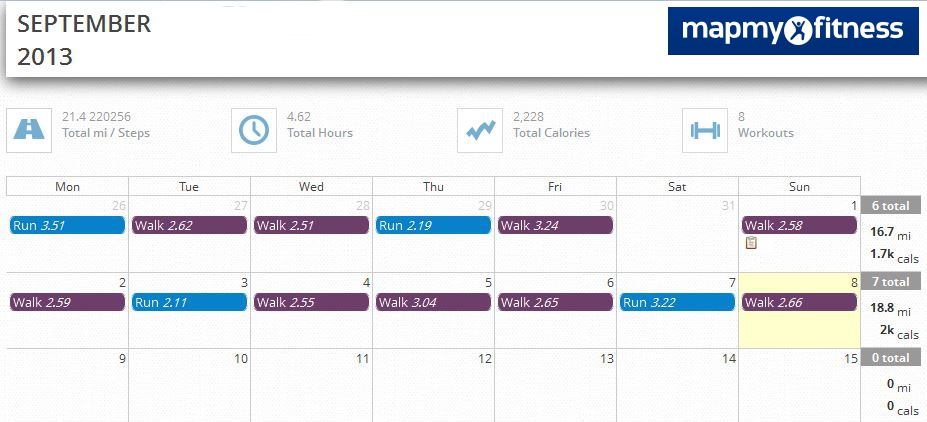
Last year, we got a discount on our health insurance if we had BMI, cholesterol, triglycerides, and blood pressure ranges that were "normal". They have stepped up the program a little this year.... and want us to achieve a certain "point" level in our "total wellness" site. I shouldn't have a problem getting to that level. One of the ways to achieve points is to document your exercise using an approved partner app (in my case MapMyFitness). The app also syncs with Nike+, so that good. I have been using the app for the last two weeks and documenting my "activities".


As you can see, I've been active over the last two weeks. All this activeness has prompted me to do a couple of things.
  1. I went ahead and looked up my race time for my last "official" 5K. Then, I ran 5K in an area around my house. The last 6yrs have not been too rough on me :-).... I'm only 20 secs a mile slower.... and I probably will get that back just by keeping my exercise up for a few weeks.
  2.  After running my "unofficial" 5K, I decided to go ahead an run a real 5K again. I'm going to run the Hoofin' it 5K on Sept. 21st.
  3.  
    Here are my time differences. I'm not a speed daemon, but I'm not a tortoise either....
     

It's been awhile....

So, it looks like it has been like 2 yrs since I have posted ANYTHING. Sorry, I have been busy with my family life stuff (moved to a new state, raising two toddlers, lots of business travel...etc). Now, the fact that I have not published anything, doesn't mean I have not been doing anything :-)... Just haven't blogged it.


So, I guess I'm going to take the action to now start posting stuff again. It's football season, and I generally watch football and waste the day away on Sunday's. So, I guess I can document stuff during the football games. I have NFL RedZone, so I shouldn't miss a minute of the action.

Wednesday, October 13, 2010

Ethical Hacker Challenges

Well, been a couple of weeks since I posted anything. This doesn't mean I haven't been busy. I have recently been following up on my "Ethical Hacking" skills and Security training. I stumbled across this site, Hellbound Hackers, which has some interesting challenges. They allow you to earn points for the challenges, so its kind of cool. They have challenges in many areas. I have been playing with the "Web Based" challenge area where they have 29 challenges.

Below are the answers.... I know...this is frowned upon. Many people believe one should only provide "hints" and let people flounder indefinitely.....But, seriously, to learn....sometimes it nice to have access to the answers when your stuck. I have provided the background detail then the actual answer. If you have stumbled on this via Google because your trying the challenges great...but be aware....... SPOILERS are below. I have made the font for the answers white so you have to highlight them to actually see the answer.

Note: This is an "Ethical Hacker" site. So, ideally there is nothing malicious going on here and your machine won't get infected while browsing the forums and such. However, it is "hacker related" and the Internet is the wild west of the 2000's so use caution. I strongly encourage you to use a VM to  go to sites like this. See my Virtualization Post on this.

Challenge #1
Basic login prompter. Nothing special here. It is the 1st Challenge. The Hint provided is: "Look at the source...."

Answer:
If you view the source you will see a comment:
it has four legs and most of the time its called 'man's best friend'
Answer: Dog

Challenge #2
This is a simple challenge as well. Just requires some basic knowledge of HTML.

Answer:
View the source and find:
IFRAME border='0' height='250' width='500' align='center' name='content' src='../basic1/b2/index.php' frameBorder='0'
IFRAME location is: ../basic1/b2/index.php

Challenge #3
Now, we start to get a little more complex. This involves spoofing your UserAgent.

Answer:
Change your user agent to bwh3_user_agent. This is pretty simple in Firefox. I used the Firefox Plug-in - useragentswitcher
You could also edit the Registry in Windows for IE....but why.... just use Firefox.

Challenge #4
Idea here is a simulation of a improperly configured login prompter that uses and htpasswd file. The file isn't found so you can see an error on the page.
First idea...... a path fuzzing challenge.

Answer:
"ERROR: htpasswd.php file not found in basic4/" means something.. so fuzz the dir paths.
You will find the password file located at:
http://www.hellboundhackers.org/challenges/basic5/htpasswd.php

Challenge #5
Just a pain to figure out, not because it is hard...but the format of the answer is hard.

Answer:
Doing a query for email or reading the source you will note * is the wildcard. Then, you have to realize that
the form is a login form AND search form.
So,
Box #1: *@*:*
Box #2: problems@Asterix-Protect.org

Challenge #6
Now, the challenges start to get a bit more "real". This one requires both some Unix simple skills and some fuzzing.

Answer:
First, fuzz the dir path:
http://www.hellboundhackers.org/challenges/basic6/logs/
You will see the files that need to be deleted. Then, run the appropriate commands.

Box #1: $ chmod a+x logs/logs.txt
Box #2: $ rm logs/logs.txt
Box #3: $ rm logs/track_logs.php

Challenge #7
This challenge requires some Binary math and knowledge of cookie manipulation.

Answer:
View your cookies. (I used Web Developer tool for Firefox)
username: sam
password: jillisdead
(This also happens to be in the source javascript, so viewing the cookie probably wasn't really required).

Now encode each into ascii:
http://www.theskull.com/javascript/ascii-binary.html
sam -> 011100110110000101101101
jillisdead -> 01101010011010010110110001101100011010010111001101100100011001010110000101100100

So, now just use the Firefox Web Developer plug-in to edit these values.
username=011100110110000101101101
password=01101010011010010110110001101100011010010111001101100100011001010110000101100100
And then fill in junk for the submit form and click go.

You will now be at the sql prompt:
Fill in 'sam' and submit

You could also use Javascript injection on the 1st part, but my example way is a little let typing.


Challenge #8
This challenge requires a slight bit of knowledge about PHP and the Register Globals vulnerability. See
http://en.wikibooks.org/wiki/PHP_Programming/Register_Globals. You can use this to perform an SQL Injection attack.

Answer:
Formulate an injection that will provide the password:
http://www.hellboundhackers.org/challenges/basic8/secure-area.php?sql_query=SELECT%20*%20FROM%20family_db

And you should get that the password is:
KingKong


Challenge #9
This challenge is complete using a type of code injection attack.

Answer:
Null Metacharacter Injection attack. ().
Search for: login.php
This will allow you to view the source of the PHP file, which will show you, if you view Source:


if($_POST['password'] == "environment" && $_POST['username'] == "FastLane"){

Go back to the Challenge Page and fill in the Username/Password combo of:
FastLane / environment


Challenge #10
This challenge requires that your IP address be in a specific range. You need to use a "free proxy service" if the page doesn't work immediately.


Answer
Viewing source on the access denied page will show you that the range needs to be:
range is around 200 to 230 and 23 to 91
Now, Google for free proxy services and use Firefox's FoxProxy to help you solve this. It is more trial and error to find a proxy in this range. I used Proxy IP: 81.168.92.66 Port: 8080

or 82.148.227.62 Port 80


Challenge #11
Basically the same as challenge #3

Answer:
Edit useragent to be:
Mozilla (HellBoundHackersOS)

I'll post some answers to the remaining 17 challenges when I get a chance to solve them. I did jump to the end..... #29 uses XPATH injection.... :-)

Sunday, September 12, 2010

Computer Forensic Analysis - The Series

This posting is not completed yet. Think of it as a preview.

Recently, a friend of mine sent me a job posting for a computer forensics analysis position.  Now, I don’t currently, nor have I ever done this type of work professionally. However,  I have done this type of work “academically” or at home for personal “enrichment”. So, I do have the experience and knowledge to perform these types of activities. The job posting “sparked” an idea in my head, that maybe I should post a blog entry about system analysis and investigation into an attack. I can’t really post it all in one blog entry, so this might be a series or something. (Time permitting in my personal life.)  Today, I figured I would cover the top level kind of stuff.

Now, before I start, I will say that normally I would have used the Backtrack LiveBoot CD or the OWASP toolkit to perform this analysis. This posting isn’t going to use those.....why? Well, the job posting asked for experience with Helix. I’ve never used Helix…. So what better reason to learn about it. Also, I think I’m going to focus on Windows based analysis.


I started my day (for this blog entry) trying to find a copy of Helix. Turns out, in 2008, the publisher of that distribution made it “commercial only” and wants ~$240 for Helix Pro. That’s pretty reasonable, but I’m not going to buy it just to blog about it. So, I did more searching and found the last free distribution ISO Helix2008R1 (https://kinqpinz.info/library/h/#00f87509 ). Ok, the site looks “shady”…so I did do some virus scanning and validation on the ISO.  I should note that my AV system went crazy with this distribution. It claims there are viruses in a number of the components of this ISO.  I have found clean copies of the components that were infected, so I’m pretty sure the virus identifications are correct vice being “false positives”. Secondly, my AV software doesn’t like that a lot of the tools are “Security Assessment Tools” and blocks them….. So, I had to move to a VM just to build a “clean” and updated distribution of the Helix suite. I’m going to refer to my “custom build” as HelixCustom. I've updated a bunch of the SysInternals tools, fixed the "Virus Infected" libraries, and added a few things to the distribution.

Now, since I’m doing this windows-based approach, my VM is a Windows 7 x64 image. It was out of date so I spent like 2 hours installing updates.  With that out of the way, I took a clean snapshot of it and turned off the virus protection……. (oh no!!!!!). Yes, I had to turn of the virus protection to build the “clean” distribution of HelixCustom. I’ll scan my custom ISO after I’m complete on a different system to verify its integrity.

Responding to an Incident

There are defined steps one must take when responding to a “potential” attack. If you are responding in a legal capacity, there are extra steps you must take to protect the evidence chain and make the data admissible in court. I’m not in law enforcement….. I do have a number of friends that are, but I don’t really want to add to the complexity of this blog posting. We are going to focus on just how to solve/investigate your incident.

NOTE: If you are Corporate IT guy and are looking to do some collection before informing Law Enforcement of a known breach…. DON’T! You will corrupt the scene. Call them now and let them respond. You may overwrite data that they can use.

RFC 3227 - Guidelines for Evidence Collection and Archiving defines the “best practices” for general digital evidence collection. Collection is based on the volatility of the data so memory is generally regarded as the first thing to collect. 

Capture Memory
(Preference: WinDD)
First step in responding to an incident would be to dump the physical memory. Computers these days have GB of memory. It is very important to preserve what is currently resident in the memory,  before proceeding. It is possible that as you respond to the situation, that memory will be overwritten or lost, so best to dump the memory as your 1st step.

In Windows, you can use WinDD from (MoonSols Windows Memory Toolkit - http://www.moonsols.com/), if you have a Helix distro use DD.exe or mdd (Mantech Memory Dump),  HBGary FastDump Pro, Nigilant32,  or other means. I will note that WinDD was probably the easiest, especially on Win64 based platforms since they require signed drivers.

Obtain Relevant System Details
Using the Helix3 distro, launch cmdenv1.bat. This will set-up your directory path to use the Helix trusted executables.

 Capture Date and Time
 Standard ways to get that would be date /t  and time /t

11:52:10.59 D:\IR> date /t
Sun 09/12/2010

11:52:13.55 D:\IR> time /t
11:52 AM
 Derive Hostname
 Using the hostname command
11:52:16.78 D:\IR> hostname
CraigLaptop-PC

Derive your current identity
Using the whoami command
11:53:03.93 D:\> whoami
Craig
Derive OS Version
Using the ver command
11:55:10.12 D:\> ver
Microsoft Windows [Version 6.1.7600]
Determine IP Interfaces and their active modes
To get the interface IP addresses in use run iplist
DiamondCS IP Enumerator v1.0 (www.diamondcs.com.au)
#         ADDRESS       BROADCAST       NETMASK
403574956 172.16.14.24  255.255.255.255 255.255.255.0
28682432  192.168.181.1 255.255.255.255 255.255.255.0
25798848  192.168.137.1 255.255.255.255 255.255.255.0
20490432  192.168.56.1  255.255.255.255 255.255.255.0
16777343  127.0.0.1     0.0.0.0         255.0.0.0
5 interfaces found.

12:36:25.73 D:\>

To determine their active modes use promiscdetect

PromiscDetect 1.0 - (c) 2002, Arne Vidstrom (arne.vidstrom@ntsecurity.nu) - http://ntsecurity.nu/toolbox/promiscdetect/

Adapter name:

 - PCI-E Gigabit Ethernet Controller

Active filter for the adapter:

 - Directed (capture packets directed to this computer)
 - Multicast (capture multicast packets for groups the computer is a member of)
 - Broadcast (capture broadcast packets)

Adapter name:

 - VirtualBox Host-Only Ethernet Adapter

Active filter for the adapter:

 - Directed (capture packets directed to this computer)
 - Multicast (capture multicast packets for groups the computer is a member of)
 - Broadcast (capture broadcast packets)

Adapter name:

 - RemoteControl USB LAN LINK

Warning: Cannot open the adapter

Adapter name:

 - Intel(R) WiFi Adapter

Active filter for the adapter:

 - Directed (capture packets directed to this computer)
 - Multicast (capture multicast packets for groups the computer is a member of)
 - Broadcast (capture broadcast packets)

12:37:05.69 D:\>
 Obtain System Uptime
 I like to use uptime and psinfo. Psinfo provides a better level of granularity and a bit more info.
12:58:27.29 D:\> uptime
Unknown HZ value! (-1868102526) Assume 100.
 12:58:38 up  4:23,0 users,load average: 0.00, 0.00, 0.00

12:58:38.19 D:\> psinfo -h -d

PsInfo v1.77 - Local and remote system information viewer
Copyright (C) 2001-2009 Mark Russinovich
Sysinternals - www.sysinternals.com

System information for \\CRAIGLAPTOP-PC:
Uptime:                    0 days 4 hours 23 minutes 38 seconds
Kernel version:            Windows 7 Professional, Multiprocessor Free
Product type:              Professional
Product version:           6.1
Service pack:              0
Kernel build number:       7600
Registered organization:   Microsoft
Registered owner:          Microsoft
IE version:                8.0000
System root:               C:\Windows
Processors:                2
Processor speed:           2.2 GHz
Processor type:            Intel(R) Core(TM)2 Duo CPU     P8400  @
Physical memory:           2940 MB
Video driver:              Mobile Intel(R) 4 Series Express Chipset Family
Volume Type  Format Label Size       Free        Free
C: Fixed     NTFS         290.07 GB  191.63 GB  66.1%
D: CD-ROM    CDFS   HC    701.76 MB              0.0%
E: Removable                                     0.0%

Installed     HotFix
n/a           Internet Explorer - 0

12:58:45.82 D:\IR>
You can also use DumpWin (http://www.niiconsulting.com/innovation/tools.html#sysinfo ) for this; however, DumpWin has a lot of other features and can be better used at other steps.

Determine Active Logged On Sessions
You can do this a bunch of ways. I’m going to use netusers and psloggedon.

13:38:40.59 D:\> netusers /l /h /v

--------------------------------------------------------
History of users logged on locally at CRAIGLAPTOP-PC:    Last Logon:
--------------------------------------------------------
CraigLaptop-PC\Craig                                     2010/09/12 11:10
--------------------------------------------------------
The command completed successfully.

13:38:53.81 D:\> psloggedon
PsLoggedon v1.34 - See who's logged on
Copyright (C) 2000-2010 Mark Russinovich
Sysinternals - www.sysinternals.com

Users logged on locally:
     9/12/2010 8:36:22 AM       CraigLaptop-PC\Craig

Users logged on via resource shares:
     9/12/2010 1:39:21 PM       (null)\Craig

13:39:24.95 D:\>
Also, running logonsessions –p will provide active data about current sessions and processes these session are running. The output of this is a bit long, so I’m not going to show it.

NOT COMPLETE YET
I know..... I still have to complete this posting. as of Sept-30-2010... I haven't found the time to sit down and finish this one up. I really do plan on doing it. Maybe this weekend :-).... It's really interesting stuff.....just the personal/family time stuff takes up my "nerd posting time"....

Saturday, September 4, 2010

You are not as anonymous as you think....

From the Panopticlick Project:
Traditionally, people assume they can prevent a website from identifying them by disabling cookies on their web browser. Unfortunately, this is not the whole story.
When you visit a website, you are allowing that site to access a lot of information about your computer's configuration. Combined, this information can create a kind of fingerprint — a signature that could be used to identify you and your computer. Some companies are already using technology to try to identify individual computers. But how effective would this kind of online tracking be?
 Turns out your not really that unique and tracking data you can't really prevent can identify your PC down to 1 in 286,777.... that's like 18.1 bits of entropy....geez

Check out the white paper.